It’s so bloody obvious…
A key tool for content creation
For a minute forget you are a business owner and think like a consumer and you are looking to buy a new boiler, a new car or caravan or are thinking about reroofing your house the chances are you will do some research.
What do you do? You type something into Google.
At this point it is worth remembering two things:
- The Google algorithm tries to list in the organic search results the web pages that answers your question most accurately
- The questions people asking you as a business are asking your competitors the same questions
So why are you not answering these questions, in detail on your website, your social media channels and any other place you publish content (Google My Business, YouTube) because one thing is for sure your local competitors aren’t doing this. The search engines will love you and your pages will rank exceptionally well.
It is also worth remembering that Google likes to see regular content being added to your website and social channels as they believe regular content means you are thinking of and engaging with your customers.
So, what to do
List all the questions you are asked by your potential customers.
1. Think about questions you have been asked about:
Your products and services
- Your prices
- Your competitors
- Your after care
2. When you are answering your questions give a complete answer, not just one or two lines.
3. We recommend that you answer in detail two questions a month.
4. When answering a question we suggest that you create a video to answer the question in detail. Although it may seem daunting to create a video, do not worry – with a little practice you will get very comfortable creating these videos.
We suggest videos as the starting point for all content because:
- People will see you in person and this will develop trust with your audience. Earning this trust is critical before people make a decision to buy from you
- Videos can be added to your YouTube channel (remember YouTube is the second most popular search engine). You can also add the video to your Google My Business listing and post it to social media
You do not have to be a videographer to create videos you can easily create videos using:
- Invideo
- Record a Zoom meeting with just yourself on the call
Make sure when you are ending the video you encourage people to contact you if they have any other questions they may have about your service – even if they decide to buy from a competitor, do not worry about this.
5. When you have created a video question and answer you then need to transcribe the video into text.
There are many expensive services to do this, but by using Google docs you can transcribe your video for free.
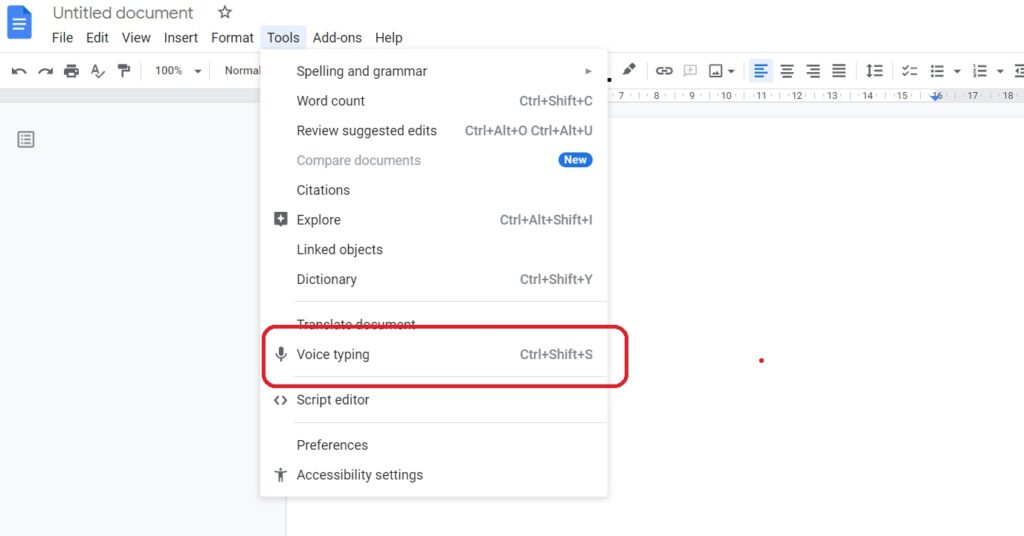
Firstly, open Google Docs and select Tools -> Voice Text (as shown below) and click the microphone button in the document.
Secondly, open YouTube and play your video through your computer. Google will then transcribe your video into text. You will need to read through the final document to make sure it has picked up everything correctly and you will need to format the document.
6. Now you need to add these to your website. We would recommend:
- Create a dedicated page about the question and answer (make sure the page is optimised – on-page SEO). On this page embed your video (linking to your video in YouTube) and add the transcribed text
- Add the question to your FAQ page, giving a short one or two line answer and then link to your full answer
- Add your FAQ created above to the bottom of the page that relates to this product or service, if applicable
- If appropriate repurpose the content and create a blog and add it to your blog page
7. Add your short FAQ to your Questions and Answer in your Google My Business listing and link to the full answer page on your website.
8. Create a Post on your Google My Business about the question and answer and link it back to your web page with the full answer.
9. Upload the video to your Google My Business account.
10. Post about your new blog in your social media channels and link back to your blog post on your website.
About Driving Local Sales
Driving Local Sales is a service owned and run by Techy Business Services Ltd.
Our local digital marketing solutions are tailored for businesses that sell locally within their community, helping them generate more enquiries and driving growth through proven strategies.
Phone: 01306 480440
Sharing is Caring
Related Posts

Exploring Advantages and Disadvantages of Using WordPress, Wix, and Squarespace
Your business website is not just the focal point of your marketing it should be looked at as a revenue generating asset of the company.

How to Generate Local Leads with Digital Marketing
In today’s digital age, you need to leverage the power of digital marketing to generate local leads effectively. By targeting your specific geographical area and

Earn Trust from Potential Customers with Gold Stars in SERPs
In many cases, the very first interaction a potential customer will have with your business, will be viewing your listings in an organic search result

Grow Your Business with Local Service Ads | Increase Visibility and Targeted Reach
Grow Your Business with Local Service Ads Are you a business owner looking to expand your reach and attract more customers in your local area?

Local Service Pages for your Local Business
Local Service Pages for your Local Business Local Search Engine Optimisation (SEO) one of the most powerful tools available to reach highly qualified prospects in

The Ultimate Guide to Local Business Schema: What You Need to Know
The Ultimate Guide to Local Business Schema: What You Need to Know For the average business owner, this article may sound too “techy”. Please do